POST
Push Lead API v2
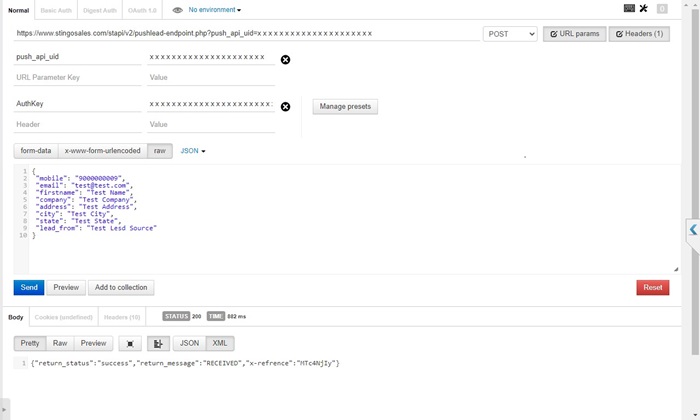
Use this endpoint to push website, portal, campaign, marketplace or third-party lead JSON into Stingo CRM.
Endpoint
https://www.stingosales.com/stapi/v2/pushlead-endpoint.php?push_api_uid={{PUSH_API_UID}}
Authentication: Header AuthKey. Generate it as HMAC SHA256 of "{company_id}_PUSH@STINGO_{push_api_id}" using key "ST{push_api_id}NG".
| Field |
Location |
Required |
Description |
| push_api_uid |
query or JSON body |
required |
Base64 value provided from Stingo push lead setting. |
| AuthKey / Authkey |
header |
required |
Generated HMAC authentication key. |
| firstname |
JSON |
recommended |
Lead/customer name. |
| mobile |
JSON |
recommended |
Mobile number. |
| customer_isd |
JSON |
recommended |
Country and ISD code in COUNTRY^DIAL_CODE format, e.g. IN^91, US^1 or AE^971. Send with mobile. Used to save the customer ISD and remove a matching +country-code prefix. If omitted, ISD remains empty; no default IN^91 is assigned. |
| email |
JSON |
optional |
Email address. |
| company |
JSON |
optional |
Company or source company name. |
| address, city, state |
JSON |
optional |
Location details. |
| lead_from |
JSON |
optional |
Lead source, campaign, project or portal name. |
| Any custom field |
JSON |
optional |
Stingo stores the raw JSON for configured mapping. |
Sample Request
{
  "firstname": "Rahul Sharma",
  "mobile": "9876543210",
  "customer_isd": "IN^91",
  "email": "rahul@example.com",
  "company": "Website",
  "address": "Sector 15",
  "city": "Gurugram",
  "state": "Haryana",
  "lead_from": "Website Contact Form"
}
cURL Example
curl -X POST "https://www.stingosales.com/stapi/v2/pushlead-endpoint.php?push_api_uid={{PUSH_API_UID}}" \
  -H "Content-Type: application/json" \
  -H "AuthKey: {{AUTH_KEY}}" \
  -d '{"firstname":"Rahul Sharma","mobile":"9876543210","customer_isd":"IN^91","email":"rahul@example.com","lead_from":"Website Contact Form"}'
Sample Response
{
  "return_status": "success",
  "return_message": "RECEIVED",
  "x-refrence": "{{REFERENCE_ID}}"
}
POST
Push Lead API v1 Legacy
Legacy lead push endpoint. Use v2 for new integrations unless your existing integration sends lead_json as form data.
Endpoint
https://www.stingosales.com/st-api/v1/push-lead-api.php?push_api_uid={{PUSH_API_UID}}
Authentication: Header AuthKey. Same HMAC process as Push Lead API v2.
| Field |
Location |
Required |
Description |
| push_api_uid |
query |
required |
Base64 push API UID. |
| AuthKey / Authkey |
header |
required |
Generated HMAC authentication key. |
| lead_json |
form-data |
required |
Full lead JSON as a string. |
Sample Request
lead_json={
  "firstname": "Amit Verma",
  "mobile": "9999999999",
  "email": "amit@example.com",
  "lead_from": "Landing Page"
}
cURL Example
curl -X POST "https://www.stingosales.com/st-api/v1/push-lead-api.php?push_api_uid={{PUSH_API_UID}}" \
  -H "AuthKey: {{AUTH_KEY}}" \
  -F 'lead_json={"firstname":"Amit Verma","mobile":"9999999999","lead_from":"Landing Page"}'
Sample Response
{
  "return_status": "success",
  "return_message": "RECEIVED",
  "x-refrence": "{{REFERENCE_ID}}"
}
GET / POST
Get Lead Data API
Fetch recently imported lead JSON data for configured push lead sources. The endpoint returns lead_data when matching records are available.
Endpoint
https://www.stingosales.com/stapi/v1/get-lead-data-endpoint.php?push_api_uid={{PUSH_API_UID}}
Authentication: Header AuthKey. Same HMAC process as Push Lead API.
| Field |
Location |
Required |
Description |
| push_api_uid |
query |
required |
Base64 push API UID. |
| AuthKey / Authkey |
header |
required |
Generated HMAC authentication key. |
Sample Request
No request body is required.
cURL Example
curl -X GET "https://www.stingosales.com/stapi/v1/get-lead-data-endpoint.php?push_api_uid={{PUSH_API_UID}}" \
  -H "AuthKey: {{AUTH_KEY}}"
Sample Response
{
  "return_status": "success",
  "return_message": "DELIVERED",
  "lead_data": [
    {
      "clickid": "12345",
      "firstname": "Customer Name",
      "mobile": "9876543210"
    }
  ]
}
POST
Complaint Registration API
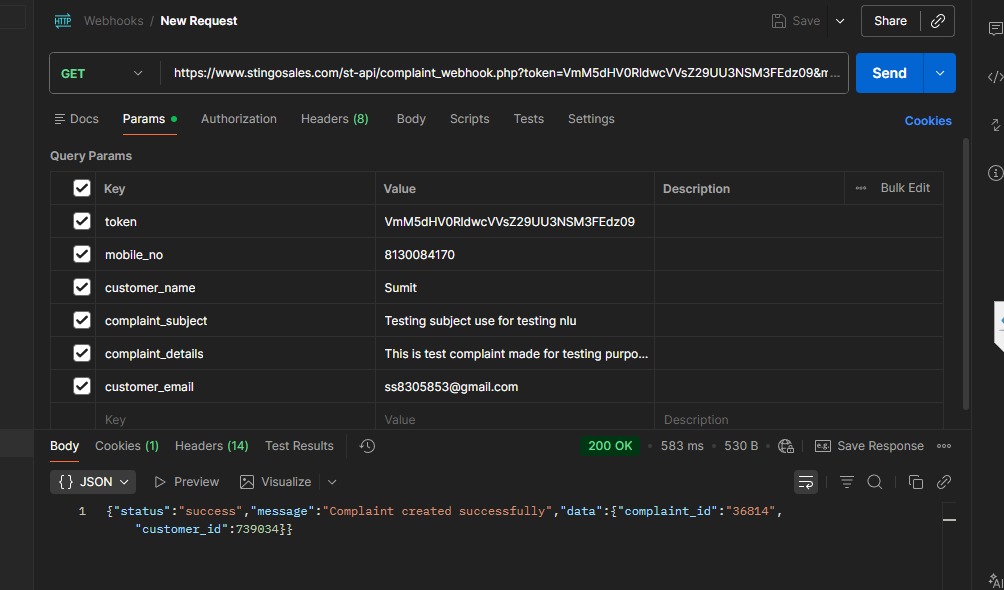
Create a customer if required and register a complaint/service ticket in Stingo CRM.
Endpoint
https://www.stingosales.com/st-api/complaint_webhook.php?token={{COMPANY_TOKEN}}
Authentication: Encrypted company token provided by Stingo support.
| Field |
Location |
Required |
Description |
| token |
query |
required |
Encrypted company token. |
| customer_name |
form-data |
required |
Customer name. |
| mobile_no |
form-data |
required |
Customer mobile number. |
| complaint_subject |
form-data |
required |
Complaint subject. |
| complaint_details |
form-data |
required |
Complaint details. |
| customer_email |
form-data |
optional |
Customer email. |
| address |
form-data |
optional |
Customer address. |
| complaint_category |
form-data |
optional |
Complaint category. |
| complaint_warranty |
form-data |
optional |
Warranty or AMC detail. |
| complaint_file |
file |
optional |
Allowed: doc, docx, pdf, odt, ppt, jpg, jpeg, gif, png, xls, xlsx, txt. |
Sample Request
{
  "customer_name": "Neha Gupta",
  "mobile_no": "9876543210",
  "customer_email": "neha@example.com",
  "address": "Delhi",
  "complaint_subject": "AC not cooling",
  "complaint_details": "Customer reported cooling issue.",
  "complaint_category": "Service"
}
cURL Example
curl -X POST "https://www.stingosales.com/st-api/complaint_webhook.php?token={{COMPANY_TOKEN}}" \
  -F "customer_name=Neha Gupta" \
  -F "mobile_no=9876543210" \
  -F "complaint_subject=AC not cooling" \
  -F "complaint_details=Customer reported cooling issue"
Sample Response
{
  "status": "success",
  "message": "Complaint created successfully",
  "data": {
    "complaint_id": "{{COMPLAINT_ID}}",
    "customer_id": "{{CUSTOMER_ID}}"
  }
}
POST
Call Complaint / Phone Support API
Create a complaint from a phone call or IVR/call-center event.
Endpoint
https://www.stingosales.com/st-api/complaint_webhook.php?token={{COMPANY_TOKEN}}
Authentication: Encrypted company token provided by Stingo support.
| Field |
Location |
Required |
Description |
| token |
query |
required |
Encrypted company token. |
| calllogid |
form-data |
required for call API |
Unique call ID. |
| mobile_no |
form-data |
required |
Caller mobile number. |
| customer_name |
form-data |
optional |
Customer name if available. |
| date, time |
form-data |
optional |
Call date and time. |
| agentnumber |
form-data |
optional |
Agent connected number. |
| callstatus |
form-data |
optional |
Call status. |
| callduration |
form-data |
optional |
IVR/call duration. |
| recordingurl |
form-data |
optional |
Call recording URL. |
| department |
form-data |
optional |
Department name. |
Sample Request
{
  "calllogid": "CALL-10001",
  "mobile_no": "9876543210",
  "customer_name": "Ravi",
  "date": "2026-06-23",
  "time": "14:30:00",
  "agentnumber": "9999999999",
  "callstatus": "answered",
  "callduration": "120",
  "department": "Support",
  "recordingurl": "https://example.com/recording.mp3"
}
cURL Example
curl -X POST "https://www.stingosales.com/st-api/complaint_webhook.php?token={{COMPANY_TOKEN}}" \
  -F "calllogid=CALL-10001" \
  -F "mobile_no=9876543210" \
  -F "customer_name=Ravi" \
  -F "callstatus=answered"
Sample Response
{
  "status": "success",
  "message": "Call logged successfully",
  "data": {
    "complaint_id": "{{COMPLAINT_ID}}",
    "customer_id": "{{CUSTOMER_ID}}"
  }
}
POST
GPS Attendance API
Mark user punch-in and punch-out with latitude/longitude and device information.
Endpoint
https://www.stingosales.com/st-api/attendance_api.php
Authentication: Company and user identifiers are required in the request body. Use only from authorized mobile apps or server integrations.
| Field |
Location |
Required |
Description |
| company_id |
JSON/form-data |
required |
Company ID. |
| user_id |
JSON/form-data |
required |
User ID. |
| unique_id |
JSON/form-data |
required |
Unique attendance session ID. |
| device_id |
JSON/form-data |
required |
Device identifier. |
| request_type |
JSON/form-data |
required |
punch_in or punch_out. |
| start_date_time |
JSON/form-data |
required for punch_in |
Punch-in date time. |
| start_longitude, start_latitude |
JSON/form-data |
required for punch_in |
Start coordinates. |
| end_date_time |
JSON/form-data |
required for punch_out |
Punch-out date time. |
| end_longitude, end_latitude |
JSON/form-data |
required for punch_out |
End coordinates. |
Sample Request
{
  "company_id": "1001",
  "user_id": "25",
  "unique_id": "ATT-20260623-25",
  "device_id": "ANDROID-DEVICE-ID",
  "request_type": "punch_in",
  "start_date_time": "2026-06-23 10:00:00",
  "start_longitude": "77.1025",
  "start_latitude": "28.7041"
}
cURL Example
curl -X POST "https://www.stingosales.com/st-api/attendance_api.php" \
  -H "Content-Type: application/json" \
  -d '{"company_id":"1001","user_id":"25","unique_id":"ATT-20260623-25","device_id":"ANDROID-DEVICE-ID","request_type":"punch_in","start_date_time":"2026-06-23 10:00:00","start_longitude":"77.1025","start_latitude":"28.7041"}'
Sample Response
{
  "status": true,
  "status_key": "SUCCESS",
  "status_code": 200,
  "message": "punch in accepted successfully."
}
POST
Background Location Tracking API
Store periodic field-user GPS coordinates for authorized mobile users.
Endpoint
https://www.stingosales.com/st-api/background_location_tracking_api.php
Authentication: Company and user identifiers are required. Tracking is accepted only for users with GPS permission and within configured time rules.
| Field |
Location |
Required |
Description |
| company_id |
form-data |
required |
Company ID. |
| user_id |
form-data |
required |
User ID. |
| device_id |
form-data |
required |
Device identifier. |
| start_longitute |
form-data |
required |
Longitude. Existing endpoint spelling is start_longitute. |
| start_latitute |
form-data |
required |
Latitude. Existing endpoint spelling is start_latitute. |
| meeting_status |
form-data |
optional |
Use start or stop to label this point as the meeting start or meeting end location. Omit for normal background tracking. |
| net_status |
form-data |
optional |
Use NetOfline/NetOffline for the last location before connectivity is lost, or NetOnline for the location after connectivity returns. Omit for normal background tracking. |
Sample Request
{
  "company_id": "1001",
  "user_id": "25",
  "device_id": "ANDROID-DEVICE-ID",
  "start_longitute": "77.1025",
  "start_latitute": "28.7041",
  "meeting_status": "start",
  "net_status": "NetOnline"
}
cURL Example
curl -X POST "https://www.stingosales.com/st-api/background_location_tracking_api.php" \
  -F "company_id=1001" \
  -F "user_id=25" \
  -F "device_id=ANDROID-DEVICE-ID" \
  -F "start_longitute=77.1025" \
  -F "start_latitute=28.7041" \
  -F "meeting_status=start" \
  -F "net_status=NetOnline"
Sample Response
{
  "message": "Location Added",
  "track_id": "{{TRACK_ID}}"
}
POST
Direct Call Tracking API
Log direct mobile calls from users to leads, including call start and call end events.
Endpoint
https://www.stingosales.com/st-api/call_initiate.php
Authentication: Company, user and lead identifiers are required.
| Field |
Location |
Required |
Description |
| company_id |
JSON/form-data |
required |
Company ID. |
| user_id |
JSON/form-data |
required |
Calling user ID. |
| lead_id |
JSON/form-data |
required |
Lead ID. |
| type |
JSON/form-data |
required |
call_start or call_end. |
| call_start |
JSON/form-data |
optional |
Start date time for call_start. |
| call_end |
JSON/form-data |
optional |
End date time for call_end. |
Sample Request
{
  "company_id": "1001",
  "user_id": "25",
  "lead_id": "5088",
  "type": "call_start",
  "call_start": "2026-06-23 14:10:00"
}
cURL Example
curl -X POST "https://www.stingosales.com/st-api/call_initiate.php" \
  -H "Content-Type: application/json" \
  -d '{"company_id":"1001","user_id":"25","lead_id":"5088","type":"call_start"}'
Sample Response
{
  "status": true,
  "status_key": "SUCCESS",
  "status_code": 200,
  "unique_id": "stingo_{{CALL_ID}}",
  "messages": "call start logged successfully"
}
POST
Inbound IVR Webhook API
Receive inbound call webhooks from supported IVR vendors such as MyOperator and Pertinax, log calls and import call leads.
Endpoint
https://www.stingosales.com/stapi/v1/inbound-webhook.php?stq={{BASE64_IVR_ID}}
Authentication: stq is the Base64 encoded IVR setting ID provided by Stingo.
| Field |
Location |
Required |
Description |
| stq |
query |
required |
Base64 encoded IVR setting ID. |
| MyOperator JSON body |
JSON |
vendor-specific |
Fields like _ai, _cr, _st, _et, _fu and _ld are accepted. |
| cli, uniqueid, duration |
query/form-data |
vendor-specific |
Pertinax-style request fields. |
Sample Request
{
  "_ai": "CALL-UNIQUE-ID",
  "_cr": "9876543210",
  "_st": 1782194400,
  "_et": 1782194520,
  "_fu": "https://example.com/recording.mp3",
  "_ld": [
    {
      "_rr": [
        {
          "_ct": "9999999999"
        }
      ]
    }
  ]
}
cURL Example
curl -X POST "https://www.stingosales.com/stapi/v1/inbound-webhook.php?stq={{BASE64_IVR_ID}}" \
  -H "Content-Type: application/json" \
  -d '{"_ai":"CALL-UNIQUE-ID","_cr":"9876543210","_st":1782194400,"_et":1782194520,"_fu":"https://example.com/recording.mp3","_ld":[{"_rr":[{"_ct":"9999999999"}]}]}'
Sample Response
Webhook is accepted and stored by Stingo. Vendor responses may be empty depending on IVR provider configuration.
POST
FCM Token Store API
Register or update a mobile device FCM token for CRM push notifications.
Endpoint
https://www.stingosales.com/st-api/store_fcm_token.php
Authentication: Company and user identifiers are required.
| Field |
Location |
Required |
Description |
| company_id |
JSON/form-data |
required |
Company ID. |
| user_id |
JSON/form-data |
required |
User ID. |
| token |
JSON/form-data |
required |
FCM device token. |
Sample Request
{
  "company_id": "1001",
  "user_id": "25",
  "token": "{{FCM_DEVICE_TOKEN}}"
}
cURL Example
curl -X POST "https://www.stingosales.com/st-api/store_fcm_token.php" \
  -H "Content-Type: application/json" \
  -d '{"company_id":"1001","user_id":"25","token":"{{FCM_DEVICE_TOKEN}}"}'
Sample Response
{
  "status": "success",
  "message": "Token stored successfully"
}